![MetaOptima Logo.png]](https://help.dermengine.com/hs-fs/hubfs/External%20Marketing%20Resources%20Folder/Logos/MetaOptima%20Logos/MetaOptima%20Logo.png?height=40&name=MetaOptima%20Logo.png)
AI Note Templates allow you to customize how AI-generated clinical notes are written in DermEngine. You can create templates for both Dx Notes and Visit Notes and tailor the instructions to your preferred note format.
How do I access AI Note Templates?
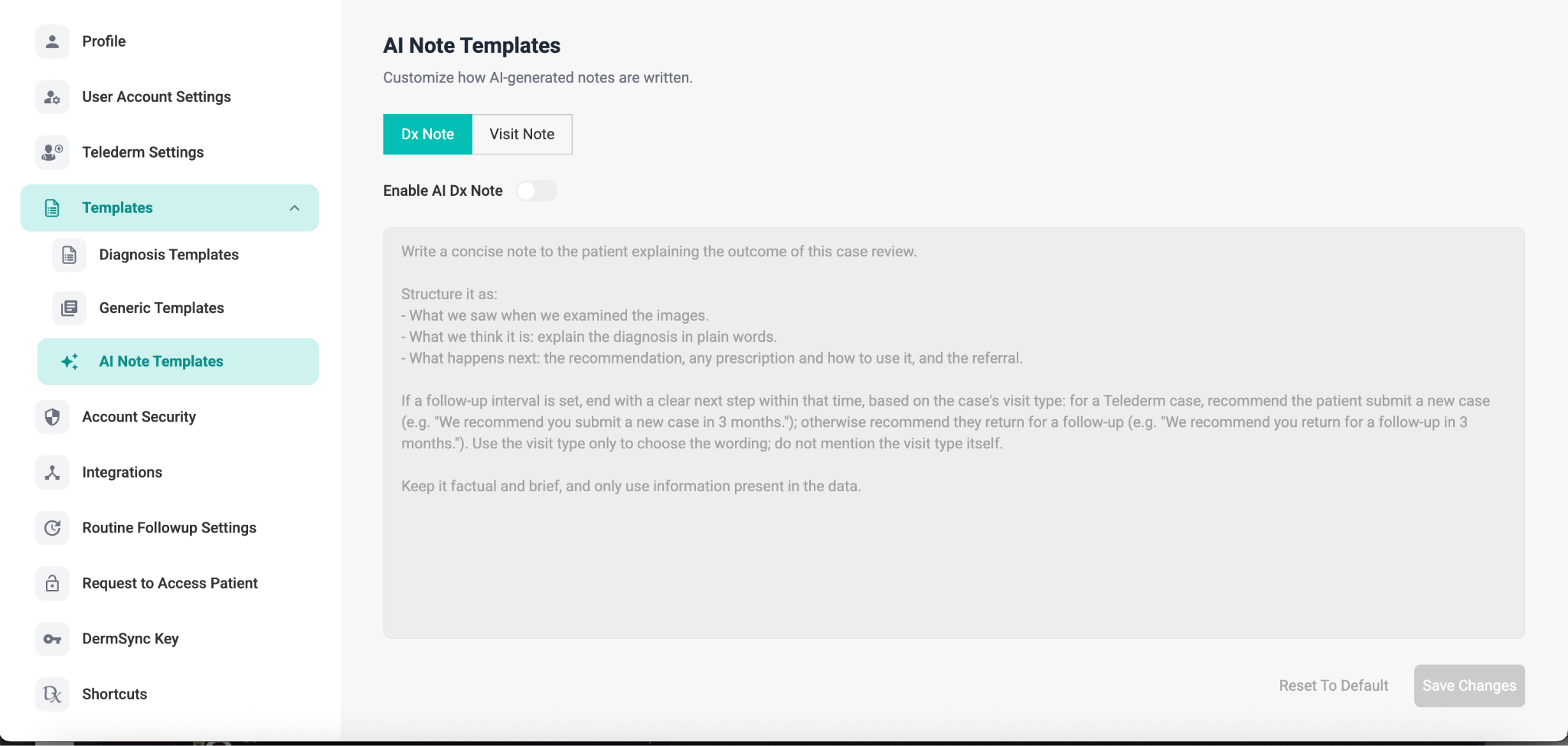
- Go to Settings.
- Select Templates from the left-hand menu.
- Select AI Note Templates.
How do I enable an AI Note?
Under AI Note Templates, select the type of note you want to customize:
- Dx Note – customize the format and instructions for AI-generated diagnosis notes.
- Visit Note – customize the format and instructions for AI-generated visit notes.
Turn on the Enable AI Dx Note toggle for the selected note type.
How do I customize the AI Note?
Use the text box to enter instructions for how you would like the AI-generated note to be written.
You can customize things such as:
- The information you want included in the note
- The order or structure of the information
- How diagnoses should be explained
- Recommendations or next steps
- Follow-up instructions
- The level of detail and style of the note
For example, you can instruct the AI to structure a note around:
- What was observed when the images were reviewed
- What the diagnosis is, explained in plain language
- What happens next, including recommendations, prescriptions, or referrals
Keep your instructions clear and specific so the generated note follows the format you prefer.
Follow-up recommendations
If a follow-up interval is included, you can also specify how the recommendation should be worded depending on the visit type.
For example, for a Telederm case, the note can recommend that the patient submit a new case within the specified timeframe. For other visit types, the note can recommend that the patient return for a follow-up.
The visit type is used to determine the wording of the recommendation and does not need to be mentioned in the generated note.
Keep AI-generated notes factual
AI Note Templates should only instruct the AI to use information that is available in the case data.
Avoid adding instructions that could cause the AI to make assumptions or introduce information that was not provided.
How do I save my changes?
Once you have finished customizing the template, select Save Changes in the bottom-right corner.
If you want to return to the original template, select Reset To Default.
What can I customize?
You can create instructions that reflect your preferred clinical documentation style while keeping the generated notes concise, structured, and based on the information available in the case.