![MetaOptima Logo.png]](https://help.dermengine.com/hs-fs/hubfs/External%20Marketing%20Resources%20Folder/Logos/MetaOptima%20Logos/MetaOptima%20Logo.png?height=40&name=MetaOptima%20Logo.png)
Clinic and enterprise administrators can create, edit, enable, disable, and review discount codes in DermEngine. Discount codes can be used by patients when submitting a teleconsult case or booking an appointment.
Step 1: Navigate to Enterprise Settings
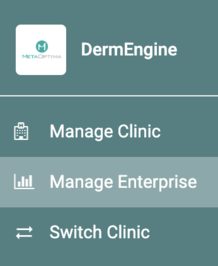
- Click your profile icon in the top-right corner of DermEngine.
- Select Manage Enterprise from the dropdown menu.
Step 2: Enable the Discount Codes Page
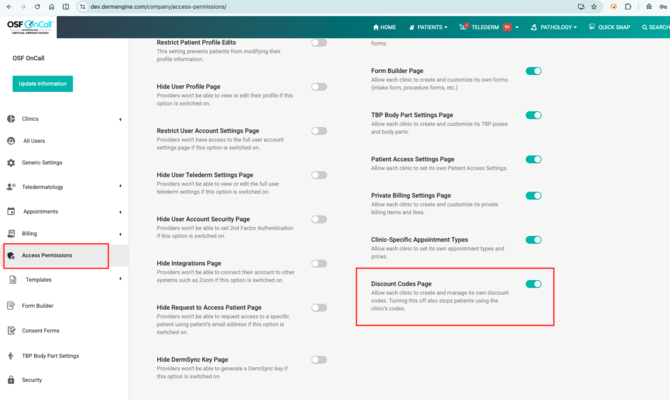
- Navigate to Access Permissions in the left-hand menu.
- Locate Discount Codes Page.
- Turn the toggle on to allow the clinic to create and manage its own discount codes.
Note: Turning this setting off also prevents patients from using the clinic’s discount codes.
Step 3: Open Discount Codes
- Navigate to Billing in the left-hand menu.
- Select Discount Codes.
- The Discount Codes page will display your existing codes and their details.
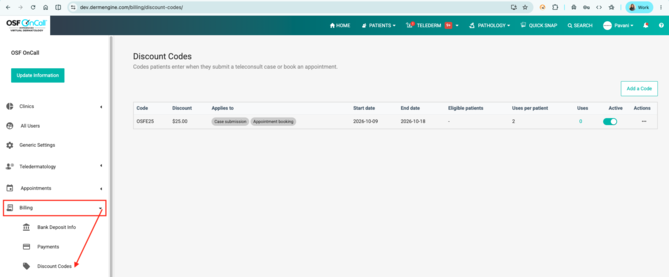
You can review the code, discount amount, applicable services, start and end dates, eligible patients, uses per patient, total uses, and active status.
Step 4: Create a Discount Code
- On the Discount Codes page, click Add a Code.
- Enter the discount code details in the form provided.
- Set the discount amount or percentage, as applicable.
- Specify the start and end dates for the code.
- Set the number of times each patient can use the code.
- Configure any other available eligibility or usage settings.
- Save the discount code.
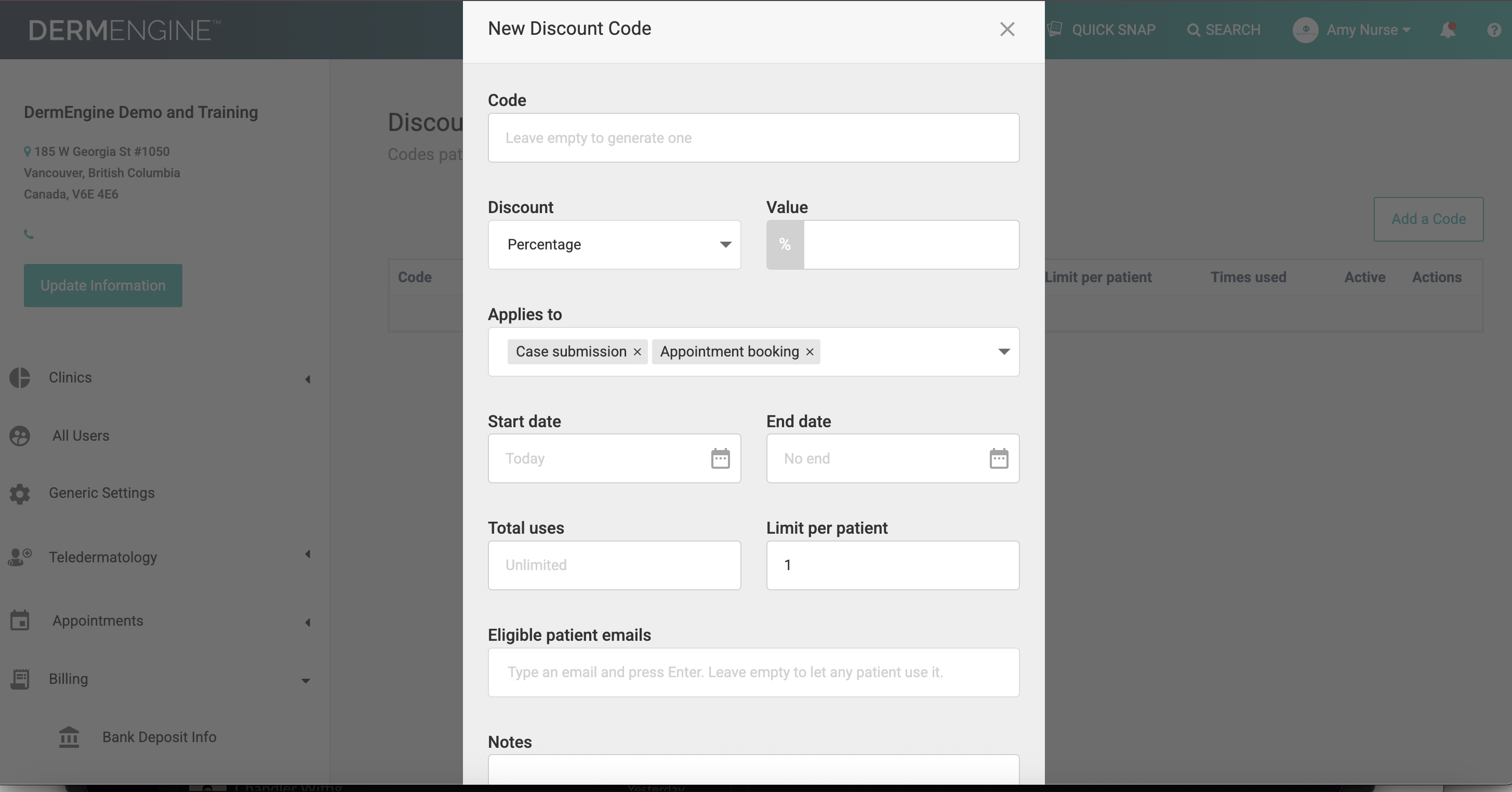
Once created, the code will appear in the discount codes list.
Step 5: Edit an Existing Discount Code
- Navigate to Billing > Discount Codes.
- Find the discount code you want to update.
- Select the three-dot menu under the Actions column.
- Choose the available edit option.
- Update the required details and save your changes.
Step 6: Enable or Disable a Discount Code
- Open Billing > Discount Codes.
- Find the relevant code in the list.
- Use the toggle in the Active column to turn the code on or off.
An active code can be used according to its configured dates and usage restrictions. Turning a code off prevents it from being used by patients.
Step 7: Review Discount Code Usage
The Discount Codes page provides an overview of each code and its usage.
You can review:
- Code: The discount code patients enter.
- Discount: The discount amount or percentage.
- Applies to: The services the code can be used for.
- Start date and End date: The period during which the code is valid.
- Eligible patients: Any patient eligibility restrictions.
- Uses per patient: The maximum permitted uses per patient.
- Uses: The total number of times the code has been used.
- Active: Whether the code is currently enabled.
Use this information to monitor your discount codes and manage their availability.
Need Help?
If you have any questions about managing discount codes in DermEngine, please contact the MetaOptima Support team.
Thank you for using DermEngine!