![MetaOptima Logo.png]](https://help.dermengine.com/hs-fs/hubfs/External%20Marketing%20Resources%20Folder/Logos/MetaOptima%20Logos/MetaOptima%20Logo.png?height=40&name=MetaOptima%20Logo.png)
Follow-Up Inquiries let you securely message your specialist after a consultation by sending questions, updates, or additional information about your skin concern. You can include text, photos, and other attachments to provide more context, helping your provider offer advice, follow-up instructions, or a preliminary assessment without requiring a new appointment.
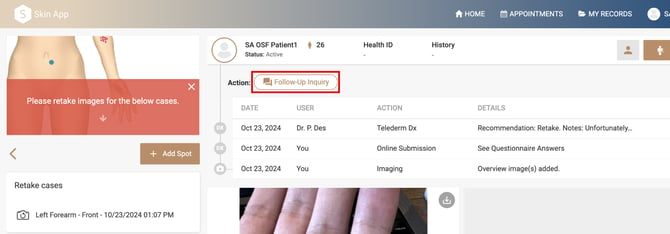
- On your spot profile, click the Follow-Up Inquiry button to begin your inquiry.
- Now you can type in your question, message, or comment.
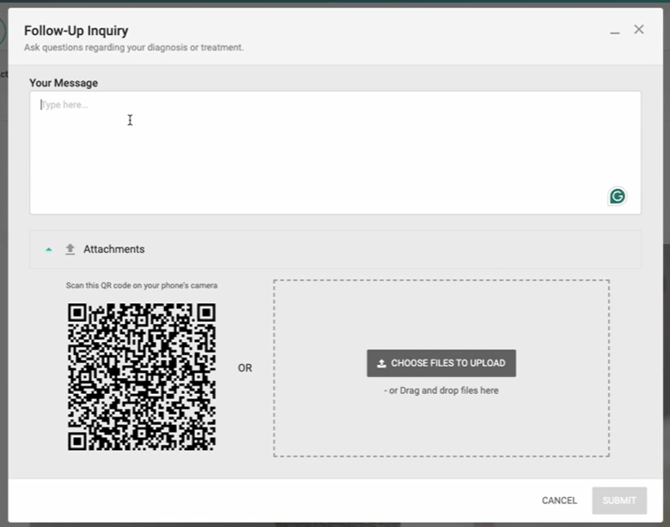
- Insert attachments by scanning the QR code with your mobile device to quickly add photos or files to your Follow-Up Inquiry.
- Alternatively, if the files are available on your computer, you can select or drag-and-drop them in.
-
When you're ready, click Submit to send your inquiry. Follow-up inquiries are only available for a limited time after your consultation, as determined by your provider. If the inquiry period has expired, you will be prompted to submit a new consultation.
- Once submitted, your provider will receive your message and can respond with advice, follow-up instructions, or additional recommendations.
- Responses from your provider will appear in the Follow-Up Inquiry conversation and will also be recorded on your timeline. You can return to the conversation at any time to review previous messages and attachments.